Catch missing logic
Review complete rendered sentences for missing predicates, unnatural transitions, repeated wording, false friends, or a tone that only looks acceptable in an isolated cell.

Export rendered target-language body copy after the first import, review it in page order, return only targeted corrections, and verify the real multilingual page before publishing.
First-round translation works with protected source units. Review Export adds the context needed to judge flow, visible composition, and relationships between neighboring blocks.
Review complete rendered sentences for missing predicates, unnatural transitions, repeated wording, false friends, or a tone that only looks acceptable in an isolated cell.
Headings, paragraphs, list markers, table rows, captions, and real block boundaries remain ordered so spacing and structural problems become visible.
Inline-link sentences remain whole, making it possible to detect word-order, punctuation, and boundary problems that cannot be judged from the anchor text alone.
Open StagLingo → Review Export. Enter default-language pages, select the target languages to review, and let the plugin derive their public multilingual URLs.
Enter one same-site default-language URL or published content ID per line. Use Page URLs and Content Discovery when preparing a larger list.
Select one or more configured target languages. An unpublished language may not have a public URL available for review.
Keep the language order configured by TranslatePress, or sort alphabetically by language name or shortcode.
Open Review file options only when you need to change delivery, format, or file layout.
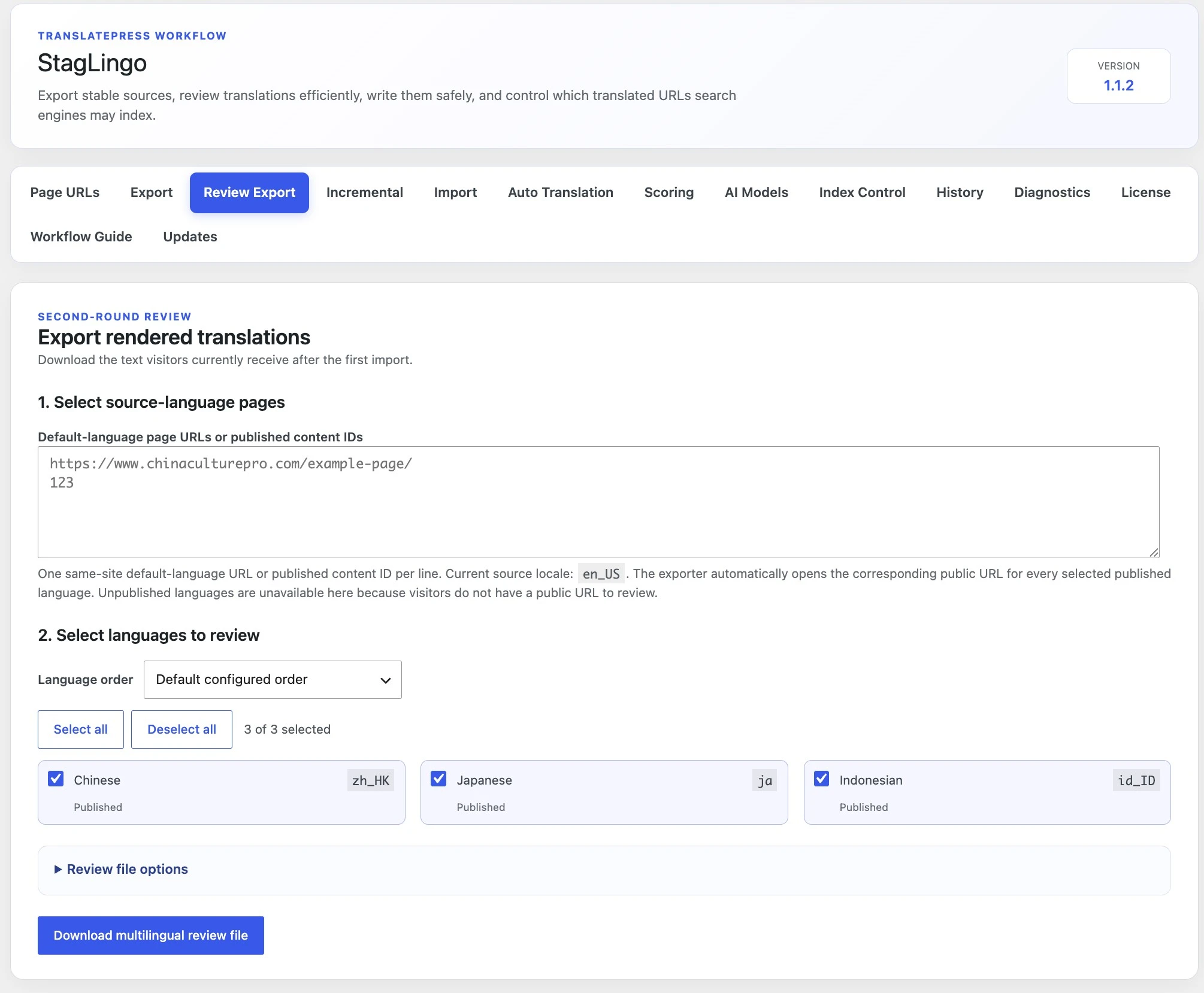
The purpose is to review the page-specific reading experience. Global and unrelated interface regions are intentionally kept outside this second-round document.
The defaults are optimized for the second round with the separate StagLingo translation Skill. Standard review files remain available for a human-only or custom review process.
Creates one self-describing review ZIP with the selected review documents, protected batch manifest, and workflow instructions.
translatepress-ai-work-batch.reviewed_import_package.Creates ordinary review documents using the selected layout without the AI package manifest and orchestration instructions.
Smaller and faster for AI review while preserving headings, paragraph breaks, list markers, and tab-separated table rows.
Easier for a person to browse visually, but larger and unnecessary for the normal Skill-based review route.
Every layout downloads once. The layout changes document grouping—not which public pages are fetched or how the review package identifies the batch.
One ZIP contains a review file for each selected language; each file contains all selected pages for that language.
One transport ZIP contains a page ZIP for each URL; each page ZIP contains all selected languages for that page.
Each page receives a folder containing a separate review file for every selected language.
All selected pages and languages are placed in one document. It is compact but less convenient for independent locale review.
One Review Export is limited to 50 page-language combinations. Multiply the number of source pages by the number of selected languages. For example, 5 pages × 9 languages = 45 combinations. If the result exceeds 50, divide it into separate batches.
The review document contains what visitors see, but it does not invent safe CSV row identities. The original first-round source package remains the identity authority for targeted corrections.
Use AI Work Package ZIP, Plain text, and the layout appropriate for the batch.
Upload the complete review ZIP to the conversation that processed the first source package and invoke translatepress-ai-work-batch. If that context is unavailable, provide the exact original source package with the review package.
The review should compare rendered copy with the original source context and return corrections only where a real language, completeness, terminology, tone, or page-flow problem exists.
Import the returned reviewed_import_package through Import Reviewed Translations. Blank cells and / preserve already accepted translations.
post_id, content_type, exact_english_source, or source_hash would bypass the reason the protected workflow exists.Review Export improves language review, but the final release decision belongs to the real page visitors receive after the correction import and cache refresh.
Clear the relevant WordPress, page-builder, server, and CDN caches. A correct stored translation can remain hidden behind an older cached response.
Open the real target-language URL in a private browser window. Do not judge the result only from the WordPress admin screen or source-language page.
Check the H1, paragraphs, lists, tables, captions, linked sentences, punctuation, and block order—not just whether translated words appear.
Open links, expand accordions, switch tabs, and inspect responsive layouts where relevant. Conditional or JavaScript-rendered content may not appear in an immediate server request.
A fluent translation can still be attached to an inactive string, and an application warning can occur even when the visitor-visible copy is correct. Diagnose the correct layer.
Keep incomplete language pages controlled through Quality and Publishing Controls until verification is complete.
Use quality and indexing controls before release, run independent scoring when needed, and keep troubleshooting guidance close when storage and visible output disagree.