
Publish better translations at multilingual scale.
StagLingo extends TranslatePress with structured export, context-aware AI translation, language-specific review, protected import, indexing control, and live-page verification.
For multilingual sites that have outgrown simple automatic translation.
StagLingo is designed for website owners, operators, and content teams that publish frequently across multiple target languages and need a repeatable quality-control process.
| Publishing profile | Typical challenge | StagLingo fit |
|---|---|---|
| 1–2 target languages with occasional updates | Translation volume, API cost, and review work remain limited. | Optional |
| 5 target languages with regular publishing | Terminology, quality review, and per-character costs begin to accumulate. | Useful |
| 10 or more target languages with frequent publishing | Every article multiplies translation cost, review work, and indexing risk. | Strong fit |
| Agencies and operators managing content-heavy multilingual sites | Repeated export, review, import, correction, and verification become an operating workflow. | Strong fit |
Every new language multiplies two problems.
Translation cost grows with every submitted character. Quality-control work grows with every language, fragmented string, technical term, link, citation, and formatting element.
Per-character costs keep growing
Automatic translation can be inexpensive at low volume. When a site publishes frequently across five, ten, or more languages, every article creates another full set of billable translation requests.
Readable is not always publish-ready
Machine translation can communicate basic meaning while still producing terminology errors, unnatural local phrasing, broken context, damaged protected content, or language-specific punctuation problems.
Small translation errors can change meaning—or damage the page.
These failures are especially common when a page is translated as isolated strings instead of one connected document with page-level context.
A specialist term becomes an unrelated entity
In skincare content, UVA means ultraviolet A. Without subject
context, a system may interpret it as the University of Virginia or expand
it into an unrelated local abbreviation.
Links and bold text split one sentence into several translations
Inline links, bold phrases, citation markers, and separate DOM nodes may be sent as independent strings. Each fragment can be grammatical by itself while the complete sentence becomes repetitive or unnatural.
A limitation becomes a product claim
Negation and evidence boundaries are high-risk. A sentence such as “an in vitro study is not clinical evidence” must never become evidence that a product improves wrinkles in people.
Citations, URLs, placeholders, or HTML are changed
A translation may alter [1][2] to [1][5],
translate a URL slug, remove a placeholder, or change the parent structure
around an inline element.
Mixed punctuation exposes an unfinished translation
Japanese and Traditional Chinese pages may contain combinations such as
”。“ or ”.“, incorrect spacing, mixed full-width
and half-width punctuation, or quotation marks from the source language.
The API cannot see what a short label means
Words such as “Apply,” “Finish,” “Light,” “Claims,” “Barrier,” or “Custom” can require completely different translations depending on whether they are buttons, product attributes, cosmetic terms, or sentence fragments.
The same concept receives several translations
Terms such as SPF, PA, INCI,
PDRN, OEM, ODM,
in vitro, and ISO 22716 may be translated,
expanded, transliterated, or localized inconsistently across one website.
English survives inside an otherwise translated page
Table headers, breadcrumbs, image titles, reusable labels, dynamic blocks, and split inline nodes may remain in the source language even when the main paragraph appears translated.
A saved value is not necessarily visible
A database write can succeed while cache, active source ownership, dynamic rendering, or a changed default-language string prevents visitors from receiving the intended translation.
Calculate the cost before adding the next language.
Google Cloud NMT currently includes the first 500,000 translated characters per month and charges $20 per million characters above that allowance. Each target language is billed separately.
Estimated billable characters for a 2,000-word article, including spaces.
Translated characters generated by one comparable article.
Translated characters generated by one comparable article.
| 2,000-word articles per month | 5 target languages | Estimated Google cost per year | 10 target languages | Estimated Google cost per year |
|---|---|---|---|---|
| 5 | 300,000 characters/month | $0 | 600,000 characters/month | $24 |
| 10 | 600,000 characters/month | $24 | 1,200,000 characters/month | $168 |
| 20 | 1,200,000 characters/month | $168 | 2,400,000 characters/month | $456 |
| 50 | 3,000,000 characters/month | $600 | 6,000,000 characters/month | $1,320 |
| 150 — approximately 5 per day | 9,000,000 characters/month | $2,040 | 18,000,000 characters/month | $4,200 |
If you already pay for a suitable AI plan
At these approximate volumes, Google NMT charges exceed the $149 annual StagLingo Single Site license.
If a $100/month AI plan is purchased only for this workflow
This compares approximately $1,349 per year for StagLingo plus the assumed AI plan against Google NMT usage alone.
Example: five articles per day
At 150 articles per month, a $100/month AI plan plus StagLingo remains less expensive than Google NMT under both five-language and ten-language examples.
A practical path from machine-readable to publication-ready.
StagLingo does not treat the first generated translation as the final result. It supports language-specific review stages that progressively improve naturalness, terminology, localization, and structural accuracy.
Meaning is usually present
Often sufficient for understanding the source, but quality can vary across languages, technical terms, short strings, inline fragments, and local style.
Ready for many publishing workflows
One translation and review pass using GPT-5.6 Sol at High reasoning or above can substantially improve fluency, terminology, context, and localization.
Designed for the highest-quality pages
A second independent review targets the residual literal phrasing, terminology drift, source-language leakage, punctuation problems, and protected-content errors that survive the first pass.
Export, review, and import with the page context intact.
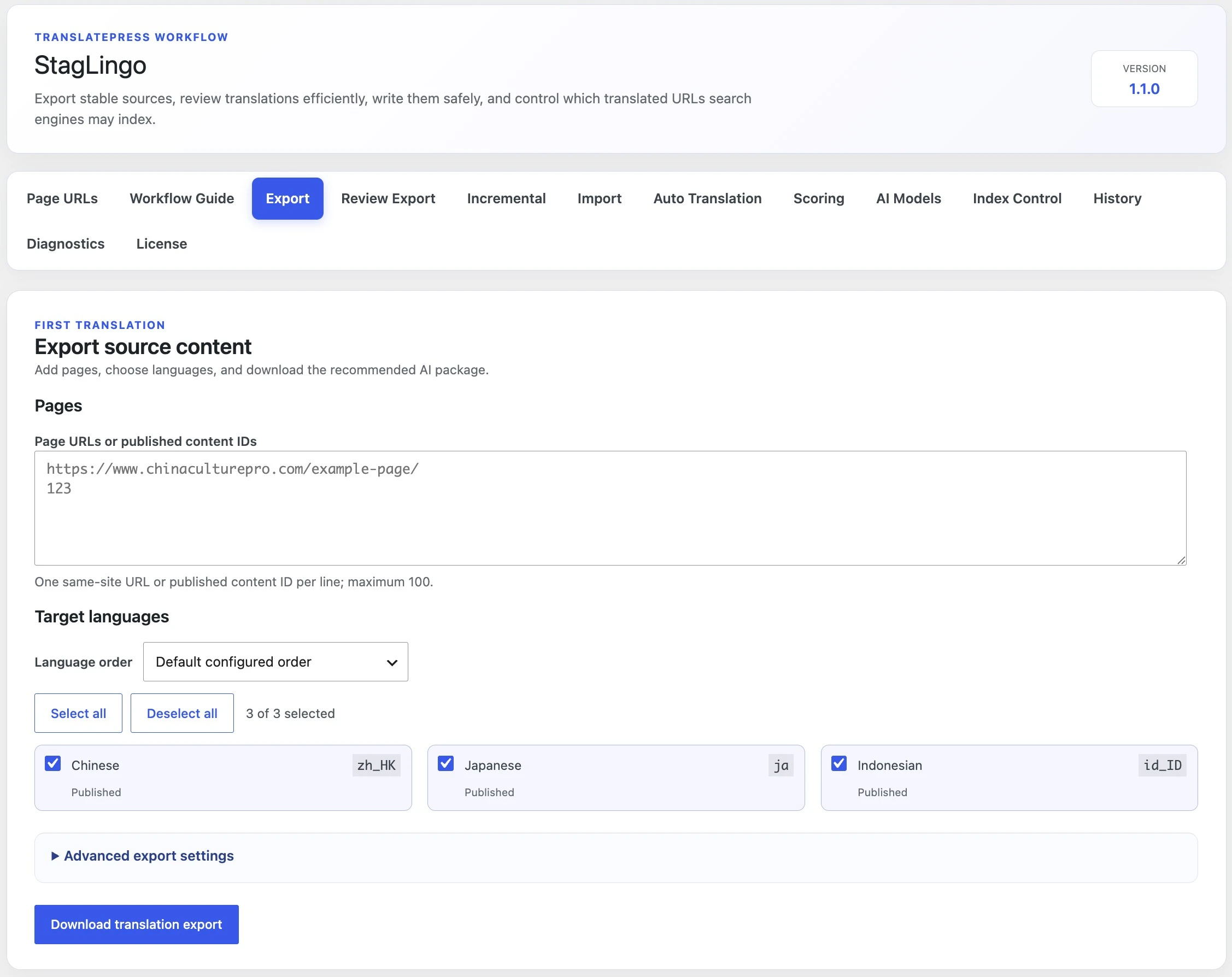
The three core StagLingo screens form a closed workflow around TranslatePress: prepare stable source content, review what visitors actually receive, and write corrected translations safely.
Export stable source content
Add published page URLs or WordPress content IDs, choose the target languages, and download a structured AI translation package.
- Process up to 100 published pages in one selection
- Select only the languages required for the current batch
- Preserve page, field, row, and target-language identity
- Use advanced export settings when the workflow requires them
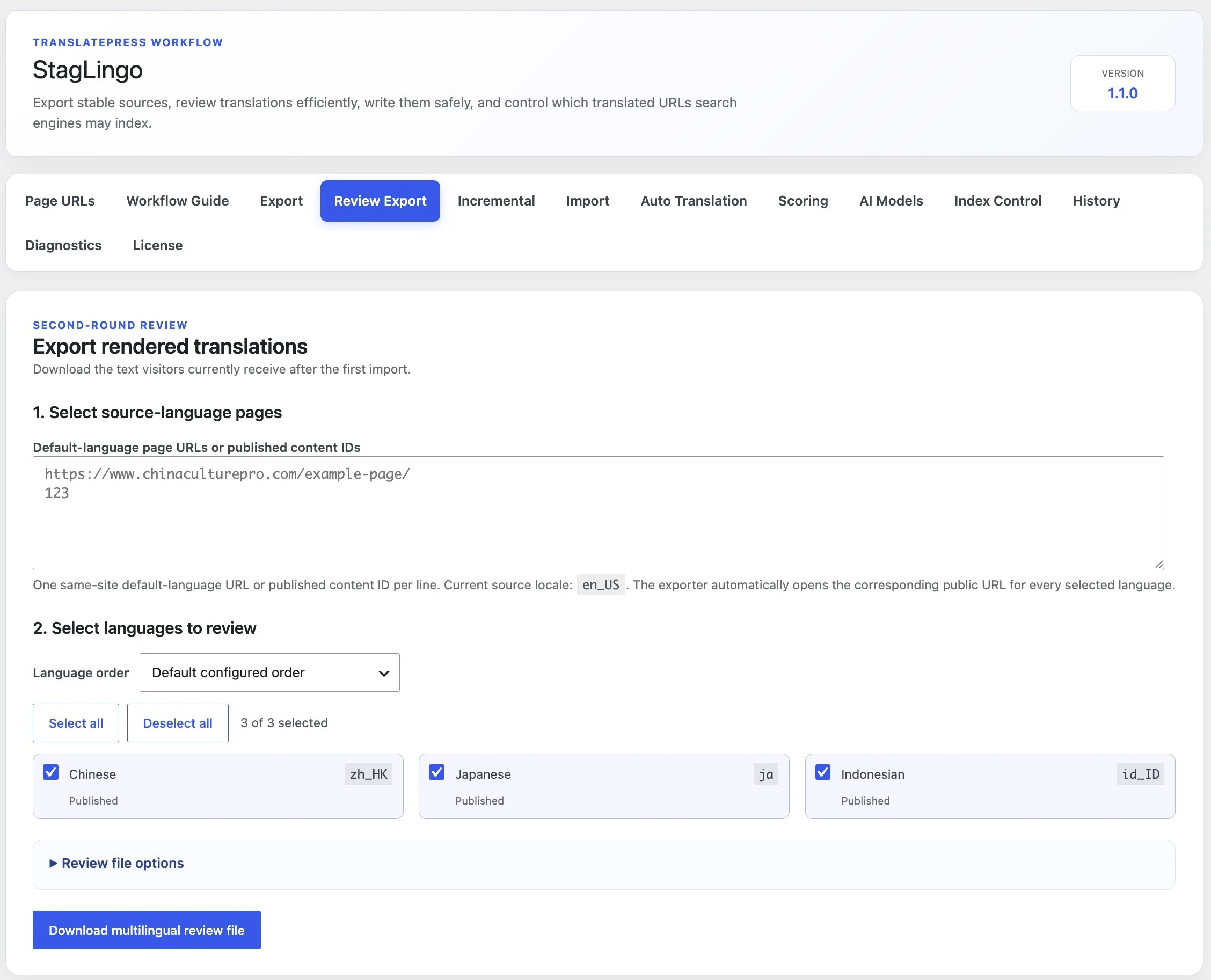
Review what visitors actually receive
Review Export opens the public target-language pages and downloads the rendered translations currently shown after the first import.
- Review languages independently instead of repeating the whole batch
- Evaluate the rendered translation rather than an isolated database value
- Find English leakage, punctuation problems, and unnatural page-level context
- Create sparse correction packages containing only required changes
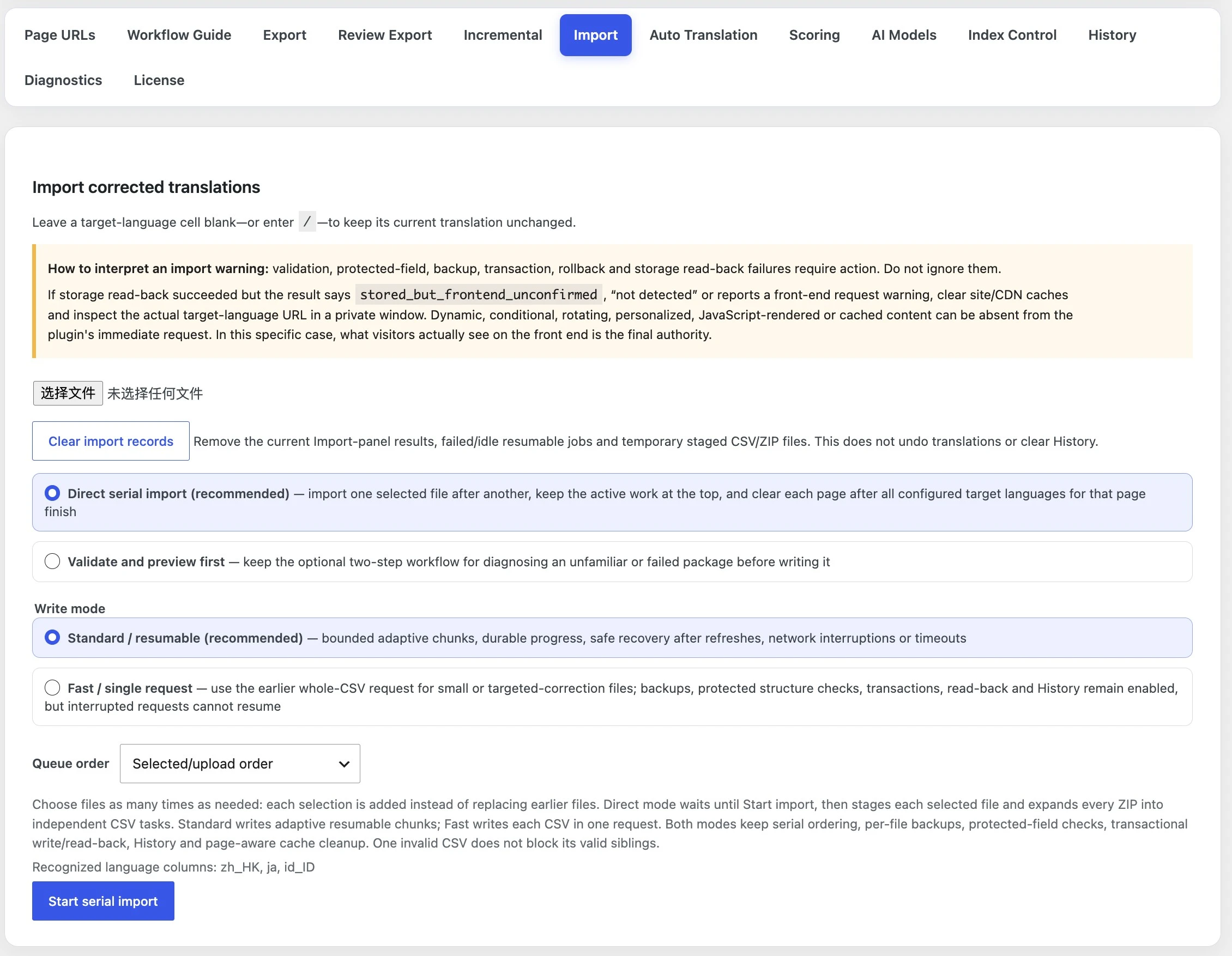
Write corrected translations safely
Import files directly in a serial, resumable queue or validate an unfamiliar package before writing it.
- Protected-field and HTML structure validation
- Per-file backups and transactional writes
- Storage read-back after values are committed
- Resumable imports after refreshes, network interruptions, or timeouts
- Live-page diagnostics when stored content cannot be confirmed on the frontend
From published source to verified translation.
StagLingo keeps page identity, target language, protected structure, review state, and final frontend evidence connected throughout the workflow.
Find and select published pages
Export published page titles and URLs, then choose the pages and languages required for the current translation batch.
Export structured source content
Create stable packages that preserve row identity, fields, page context, HTML, URLs, citations, and protected content.
Translate and review with AI
Use ChatGPT or another capable model for the first translation and, when needed, a second language-specific review.
Import with validation and recovery
Validate packages, create backups, apply sparse writes, read committed values back, and resume interrupted work.
Verify what visitors actually see
Inspect rendered target-language pages and separate real failures from removed source strings, dynamic content, and verification-only warnings.
Published content inventory
Export WordPress titles and URLs for translation planning.
Multilingual noindex management
Keep incomplete language pages out of search until they are ready.
Changed-source tracking
Identify content that changed after the earlier translation workflow.
Language-specific quality scores
Evaluate quality by URL and language instead of assuming every output is equal.
Inspectable workflow history
Keep translation operations, imports, and results easier to trace.
Actionable error evidence
Know whether a warning requires correction, re-export, cache review, or no action.
Start with visibility. Upgrade for the complete workflow.
Free provides essential page discovery, quality, and search-control tools. Premium unlocks the full export, AI translation, review, import, and verification pipeline.
Essential controls
For evaluating StagLingo and managing multilingual foundations.
- Published page URL and WordPress title export
- Multilingual Index Control
- AI translation scoring
- Core diagnostics
- License and account management
The complete translation workflow
For sites that publish and maintain multilingual content at scale.
- Multi-page, multi-language source export
- Structured AI translation work packages
- Per-page and per-language ZIP layouts
- Rendered Review Export
- Language-specific second-round review
- Protected sparse CSV import
- Serial and resumable import queues
- Backups and transactional read-back
- Incremental source-change tracking
- Live-page verification
- Actionable import diagnostics
- Automatic translation model configuration
One Premium workflow.
Choose the sites you need.
Every Premium license includes the complete StagLingo workflow. TranslatePress and AI service access are purchased separately.
Secure checkout powered by Freemius. Taxes may apply. Licenses renew annually until cancelled. StagLingo does not include a TranslatePress license, ChatGPT subscription, OpenAI API usage, or another AI provider’s fees.
Before you translate your next page.
Need help with compatibility, licensing, or your workflow? Email hello@stagatlast.com.
Does StagLingo replace TranslatePress? +
No. StagLingo is an extension and workflow layer for websites already using TranslatePress. TranslatePress remains responsible for serving multilingual content on the website.
Does StagLingo require Elementor? +
No. StagLingo is not related to Elementor and is not tied to any page builder. It works at the WordPress and TranslatePress workflow level.
Does the StagLingo license include ChatGPT or AI usage? +
No. StagLingo structures and manages the translation workflow. Users provide access to ChatGPT or another supported AI service. Separate subscriptions, usage limits, or API charges may apply.
Which ChatGPT plan may be required? +
GPT-5.6 Sol High is available on eligible paid plans, but usage limits apply. Occasional publishers may be able to use an existing plan. High-volume workflows may require a higher-usage Pro plan or another model-access arrangement.
Does StagLingo guarantee a 9.5 or higher score? +
No score can be guaranteed for every language and content type. Internal random-sample evaluations averaged approximately 9.3 after one structured GPT-5.6 Sol High-or-above pass and reached as high as 9.8 after two review rounds. Results vary by source, language, model, reasoning level, and review.
Does Google penalize automatically translated content? +
Automation alone is not the issue. The risk comes from indexing large amounts of inaccurate, unnatural, unhelpful, or poorly localized content. StagLingo helps reduce that risk through noindex control, language-specific review, protected import, and live-page verification. It cannot guarantee rankings or eliminate every search risk.
When is StagLingo more economical than Google Translation API? +
Using 12,000 characters per article, the $149 annual license reaches the Google NMT cost at approximately 19 articles per month for five target languages or 10 articles per month for ten target languages, assuming the user already has suitable AI access. If a $100 monthly AI plan is purchased solely for this workflow, the approximate break-even points become 103 and 52 articles per month respectively.
Can I keep unfinished translations out of search? +
Yes. Index Control lets site operators keep incomplete language versions noindexed until translation and review are complete.
What happens when my annual license expires? +
Premium functionality and updates require an active license. Existing TranslatePress data and StagLingo Free functionality remain available.
Where do I manage licenses, invoices, and subscriptions? +
Customers can manage downloads, licenses, active websites, invoices, payment methods, renewals, and cancellations through the StagLingo My Account portal.
Make multilingual publishing a controlled system.
Export stable TranslatePress content, translate and review with the AI you choose, import it safely, and verify what visitors actually receive.
Multilingual WordPress publishing, without the guesswork.
Export stable source content, translate with the AI you choose, review in context, import safely, and verify what visitors actually see.
Ready for multilingual review
German186 translation units
9.2Japanese184 translation units
9.0Arabic181 translation units
8.9Built for content teams using
Translation is easy.
Publishing it safely is not.
Generic translation tools stop at generated text. StagLingo manages the fragile part: preserving WordPress structure, keeping every language aligned, and proving the final page works.
Context gets lost
Short strings, reusable labels, SEO fields, tables, and inline links need different translation decisions.
HTML gets damaged
One changed anchor, citation, attribute, or placeholder can break a page or leave visible English behind.
“Saved” is not “visible”
A database write can succeed while caches, dynamic blocks, or active source identities keep the front end unchanged.
From source page to verified translation.
Each stage passes stable context to the next, so your AI can focus on language quality while StagLingo protects the publishing structure.
Export clean source content
Capture stable TranslatePress sources, page context, HTML structure, attributes, SEO fields, and reusable text identities.
Translate with the AI you choose
Send structured work packages to your preferred AI or run automatic translation without losing row identity or context.
Review before anything is written
Compare rendered translations, correct only what needs changing, and preserve protected links, tags, citations, and placeholders.
Import, verify, and publish
Write translations safely, read them back, clear relevant caches, and verify the translated page on the live front end.
More than a CSV importer.
StagLingo gives editors, agencies, and multilingual site owners a repeatable operating system for translation—not another disconnected translation box.
HTML integrity
Keeps inline tags, links, anchors, citation markers, and protected structure intact.
Stable row identity
Preserves source hashes and content ownership so every write targets the correct TranslatePress record.
Sparse corrections
Imports only required translations or corrections instead of rewriting completed cells.
Front-end evidence
Separates a successful database write from a translation that is actually visible on the rendered page.
Recoverable imports
Creates backups and reads committed values back before the workflow reports success.
Search control
Keep unfinished language pages out of search while allowing completed translations to be indexed.
Start free. Upgrade when translation becomes a workflow.
Free keeps essential discovery and search-control tools available. Premium unlocks the full export, AI, review, import, and verification pipeline.
Essential controls
For evaluating StagLingo and managing the foundations.
- ✓Page URL and WordPress title export
- ✓Language index control
- ✓AI translation scoring
- ✓Core diagnostics and license management
The complete workflow
For sites that publish and maintain multilingual content.
- ✓Multi-page, multi-language AI work packages
- ✓Per-page and per-language ZIP export layouts
- ✓Rendered review export for native-language QA
- ✓Protected sparse CSV import with backups
- ✓Automatic translation with your selected AI
- ✓Incremental tracking for changed source content
- ✓Live-page verification and actionable diagnostics
- ✓Translation quality scoring and review workflow
One Premium plan.
Choose the sites you need.
All Premium features are included in every license. Change the number of active sites without changing your workflow.
Secure checkout powered by Freemius. Taxes may apply. Licenses renew annually until cancelled.
Before you translate your next page.
Need help with compatibility or your workflow? Email hello@stagatlast.com.
Does StagLingo replace TranslatePress?+
No. StagLingo is a translation workflow and quality-control layer built for TranslatePress. TranslatePress remains responsible for serving the translated website.
Do I have to use one specific AI provider?+
No. The manual AI work-package workflow is provider-independent, and Premium also includes automatic translation through the AI model configuration available in the plugin.
What remains available in the Free version?+
Free users retain URL and WordPress title export, Index Control, AI scoring, core diagnostics, and license management. Premium workflow tabs are clearly marked and locked.
What happens when my annual license expires?+
Premium functionality and updates require an active annual license. Your Free features and existing TranslatePress data remain available.
Can I move a license to another website?+
Yes. Deactivate the old site and manage activations from My Account, subject to the site limit of your license.
What is the refund policy?+
StagLingo includes a 7-day money-back guarantee when a product issue makes it unusable and we are unable to resolve it. See the full Refund Policy before purchase.